





Skurkbro's Retexture Project — 2K version for better performance and lower disk usage
Starfield Photoscanned 2K No AI upscaling BA2 archive WIP
4K original version available here
About
 SRP Starfield is a texture mod that replaces vanilla textures with brand new photoscanned textures in higher resolution, making the game look crisp and more detailed. Textures have been fine-tuned in all color maps to slot in perfectly and maintain the same feeling as vanilla. This version is in 2K resolution. No AI upscaling was used.
This is a modification of the original mod by Skurkbro. No credits are claimed over the original work — this version is shared so users can enjoy improved performance and reduced disk space usage in their modlists. Permissions are fully open.
⚠ Warning — DLSS-3 / FrameGen compatibility
This mod may be incompatible with certain DLSS-3 / FrameGen mods and can cause blackscreen, flickering, or blurry texture issues. This cannot be fixed until another texture mod author makes a public fix. The author does not own an NVIDIA 40 series card and cannot debug this.
Coverage Progress
 This mod is a work in progress and will be updated over time. Check below before downloading to see what is currently covered.
Architecture — Towns / Cities
New Atlantis
90%
Akila
55%
Neon
0%
Architecture — Universal
Concrete
90%
Wood
90%
Metal
0%
Landscape — Ground (1/2)
Dirt
100%
Grass
100%
Gravel
100%
Moss
100%
Sand
100%
Snow
100%
Landscape — Ground (2/2)
Rock
100%
Manmade
100%
Misc
70%
Volcanic
40%
Ice
5%
Installation
 Step 1 — Preparation
Locate or create StarfieldCustom.ini. It belongs in one of these locations depending on your setup:
Vanilla: #DRIVE:/Users/#Name/Documents/My Games/Starfield
Modded: #DRIVE:/#Program Files/Steam/Steamapps/Common/Starfield
If the file doesn't exist, create a text document and name it exactly StarfieldCustom.ini. Make sure file extensions are visible in Windows.
For Mod Organizer 2 users: your .ini files are located at the Jigsaw icon in MO2.
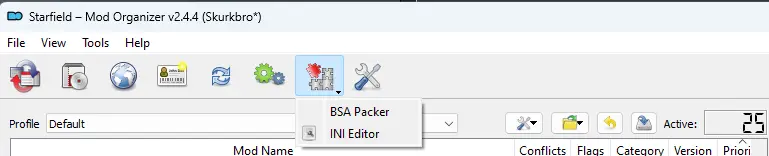
Add to StarfieldCustom.ini:
[Archive] bInvalidateOlderFiles=1 sResourceDataDirsFinal=
Step 2a - Manual Installation
It is strongly advised to use a mod manager (Vortex or MO2) instead of installing manually. If you still want to install manually, extract the main folder into one of these:
Vanilla: #DRIVE:\Documents\My Games\Starfield Modded: #DRIVE:\#Program Files\Steam\steamapps\common\starfield
If you downloaded the loose files version, you're done — no further steps needed.
Step 3 - BA2 Archive Installation
Install via Mod Manager or manually (step 2a), then manually register the BA2 archives in your StarfieldCustom.ini:
[Archive] bInvalidateOlderFiles=1 sResourceDataDirsFinal= sResourceIndexFileList=Starfield - LODTextures.ba2, Starfield - Textures01.ba2, Starfield - Textures02.ba2, Starfield - Textures03.ba2, Starfield - Textures04.ba2, Starfield - Textures05.ba2, Starfield - Textures06.ba2, Starfield - Textures07.ba2, Starfield - Textures08.ba2, Starfield - Textures09.ba2, Starfield - Textures10.ba2, Starfield - Textures11.ba2, Starfield - TexturesPatch.ba2, SRPSFArchitecture - Textures1.ba2, SRPSFLandscape - Textures1.ba2, SRPSFLandscape - Textures2.ba2, SRPSFLandscape - Textures3.ba2, SRPSFLandscape - Textures4.ba2
Step 4 - Conflicts & Overwrite (multiple mods)
If you already have another BA2 mod installed, add the new archives at the very end of the existing sResourceIndexFileList line. Archives loaded last win conflicts. The last archive must not end with a comma.
BeforesResourceIndexFileList=..., Mod1.ba2, Mod2.ba2
After — SRP archives win conflictssResourceIndexFileList=..., Mod1.ba2, Mod2.ba2, SRPSFArchitecture - Textures1.ba2, SRPSFLandscape - Textures1.ba2 <-- no comma here
Every BA2 archive must be written with its full name including the .ba2 extension. Separate each with a comma " , " except the very last one. Whatever loads last wins conflicts — so placing this mod's archives last means its textures overwrite all previous ones.
Requirements
 Minimum
GPUNVIDIA RTX 2080 or AMD Radeon VII
VRAM8 GB
NoteGTX series not recommended — performance will suffer
UpscalerDLSS or FSR3 advised if you notice performance dips
Recommended
GPUNVIDIA RTX 3080+ or AMD Radeon RX 6800+
VRAM12 GB
NoteHandles 2K textures smoothly without an upscaler
UpscalerStill recommended — free +10 to +20 FPS with minimal quality loss
Many users (including the author) report a performance increase when using the BA2 archive version over vanilla textures, with smoother frametimes and reduced micro-stutters.
Bug Reports
 If you think this mod is causing bugs or issues, report them in the comments or bugs section. To speed up diagnosis, provide a detailed description — for example, whether a texture turns black at certain angles or times of day. A screenshot along with the relevant planet and star system name will save significant time.
Texture Compression Reference
 If you plan to edit these textures with Photoshop, GIMP, or another image editor, keep the following compression formats in mind when recompressing:
Map Type | Recommended Format | Notes |
|---|---|---|
Color maps (Albedo, Diffuse) |
| BC1 is Bethesda's choice (decent quality). BC7 is higher quality but bad for textures with Alpha channels. |
Grayscale maps (rough, ao, height, opacity, emissive) |
| Standard for single-channel maps. |
Normal maps |
| Not natively supported by Photoshop or GIMP. Use AMD Compressonator. Wrong format causes shadow seams and pitch-black surfaces at sunrise/sunset. |
Other Mods by the Author
 The original author also made photoscanned texture mods for other games:


Thanks to Unikko for sharing the BA2 Upgrader V3.
Support the original author's work — 100% goes back into mods and projects:
Instructions
(I highly advice You grab a Mod Manager (Vortex or Mod Organizer 2) and install Your mods that way instead.)
Extract main folder into either:
(Vanilla) "#DRIVE:\Documents\My Games\Starfield"
(Modded) "#DRIVE:\#Program Files\Steam\steamapps\common\starfield"
(the # will be different on each system, so it's almost impossible to predict)
Depending on if You have a mod installed that changes the mods boot location.
If You downloaded the loose files, then You've sucessfully installed this mod don't need to read the rest.
Architecture - Loose files
All textures are in 2K Loose files
Architecture - BA2 - 2K
Heads up! Filename has changed, you need to adjust the name change in your StarfieldCustom.ini if you're updating This is the BA2 version, please see install guide on description. Don't combine this with the loose files.
Landscape - Loose files - 2K
All textures are in 2K Loose files
Landscape - BA2 - 2K
Heads up! Filename has changed, you need to adjust the name change in your StarfieldCustom.ini if you're updating This is the BA2 version, please see install guide on description. Don't combine this with the loose files.


