

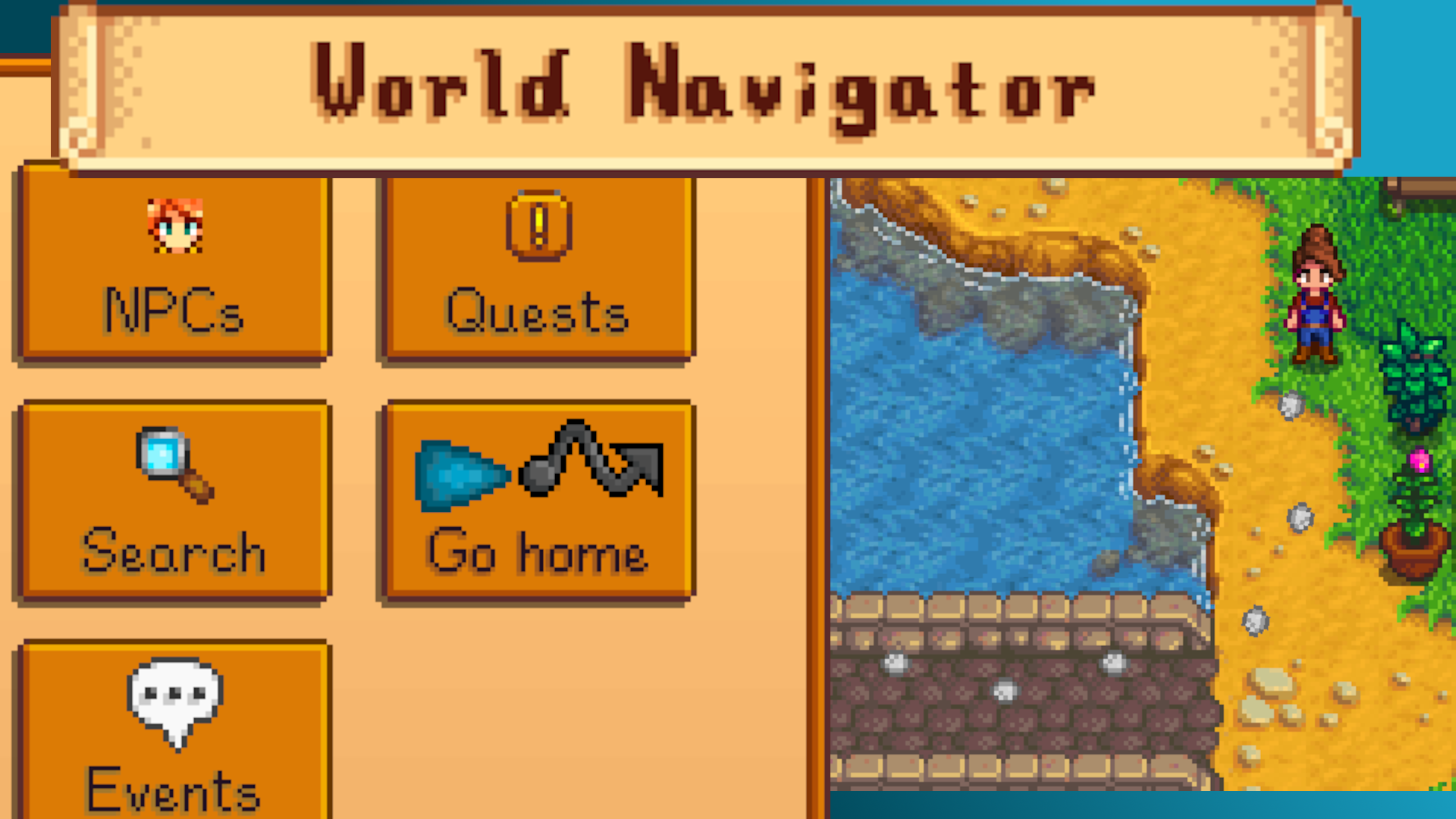
World Navigator is a multipurpose, interactive, extensible in game navigation system and guide.
World Navigator is like if you took the navigator or map app on your phone or from any GPS device and adapted it to Stardew Valley. It combines some effective algorithms with a multipurpose menu to provide real time guidance or plain language directions written down on a piece of scrap paper in game.
The initial release of this mod took almost a year - I wanted something like this to exist and I had a ton of fun (and plenty of frustration) making it happen. I hope you enjoy it and find it useful!
How to install:
- Install the latest version of SMAPI.
- Download this mod and unzip it into Stardew Valley/Mods.
- Likewise install the required mods listed in Requirements above.
- Run the game using SMAPI.
If you need additional help installing the mod, the Stardew Valley wiki has more detailed instructions.
To uninstall the mod, delete this mod's folder from your Mods folder.
Note: World Navigator can be installed (or removed) at any time.
How do I view the menu?
By default, press B on a keyboard.
Open the World Navigator menu by pressing the button you set in the config.json that generates after you open the game or that you set in the Options submenu within World Navigator's menu. You can also use a mod like Generic Mod Config Menu to set the key.
If you use Better Game Menu, right click on the map tab of your game menu and select World Navigator. If you use Iconic Framework, an icon for World Navigator is included among your icons. If you are a controller user and use Star Control, World Navigator is available as an item to use with that mod. If you use Mobile Phone or Mobile Phone Continued, an icon for World Navigator is included on your phone.
Upon opening the World Navigator menu, click around and get to know the features that are available or keep reading here...
Features
NPCs, quests, location search, a customizable home point, points of interest, and more
World Navigator provides a detailed menu which allows you to select villagers, quests, events, or even your home as your navigation target and then World Navigator can guide you to them. You can also search for any location in your Stardew save and do the same (clickable map included). With World Navigator you are unlikely to get lost in the wilderness again. Furthermore, other mods can add their own points of interest to the POI submenu so you can easily select those as destination targets. (Mod authors, see below for more on how to do that.)
World Navigator works with modded NPCs, quests, locations, and events!
Active guidance and a piece of scrap paper
World Navigator gives you the choice of using active guidance or written directions (or both).
Active guidance means you will get real time direction using your choice of a visual: a pointer, a line, or footsteps. Whenever you reach a warp or minecart or other form of travel, a little sign will pop up to tell you what the next step is (e.g. "Go south to Pelican Beach" or "Take the minecart to Pelican Town"). It will find the shortest* route to navigate you around obstacles within and across locations. Note that if something can be picked up (e.g. forage, furniture) or removed (e.g a weed or a resource clump (stumps, boulders, etc.) if you have the necessary tool) then World Navigator ignores it as an obstacle.
Alternately World Navigator can write directions in plain language onto a piece of scrap paper that you can reference for that analog feel, or if you just want to know where something is in the world but do not want to go there now. You will receive an item, a piece of scrap paper that you can right click (the Check/Do Action button) to view. In some cases you may even find a little doodle on the piece of paper. The scrap paper is otherwise just trash to throw away or keep if you like.
* In some very specific situations the shortest route will be missed across multiple locations because of certain approximations that are made, but that will be rare. The guide will always find the shortest route within your location.
The world, getting around, NPC schedules, and secrets
World Navigator has a good understanding of the world and how you can move around it via anything from walking to minecarts, from the bus to the Ginger Island parrot express. It can understand when buildings are open to visit, whose room an NPC is standing in (and if you can enter it), where an NPC is located in the next few hours, and more. It checks the locations and travel options in your save in the moment that you use it. You can even customize some of what it checks or ignores in the built in options submenu (but this does not change the world around you).
Everything in the previous paragraph includes modded locations and many modded forms of travel.
World Navigator includes built in support for Central Station and its content packs (with full support planned in Central Station 1.4), but some modded forms of travel will require additions by mod authors (see below for more on how to add that).
World Navigator can even tell you who you need to greet for the Introductions quest. Check out the NPC submenu for that.
A note on the "describe guidance" feature: cardinal directions within a location are approximate: the instruction "go north 10 tiles" could mean going as much as 22 degrees off of north. This disparity exists by nature of the Anya algorithm, so named because it assumes that travel at "any angle" is doable. This disparity is more likely relevant if the instruction specifies many tiles of distance, so it may help to request the instruction again after you have traversed a portion of the distance (instructions are updated in real time). Additionally, the mod ignores obstacles that it thinks you can remove like forage that you can pick up or debris that you can break with your tools. If you rely on descriptions of your in game surroundings, just know that you may still encounter these kinds of obstacles in your travels.
Also... there are even a few secrets that you might find.
Options and Config
World Navigator has its own options submenu. These options are saved to your save file and not to a config.json file. Open World Navigator and click the Options button. Here are a selection of the options you can set:
- Choose your home location which you can use from the main World Navigator menu with its "Go home" button (by default this is already set to the front of your farmhouse)
- Choose the type of visual used during active navigation: an arrow that circles the player, a solid white line, or footsteps (my personal favorite), or supply your own with a simple Content Patcher mod (see the section "For mod authors" below)
- Choose whether to show an indicator at your destination (or above an NPC) during active navigation
- And more... whether it is to customize the search submenu's clickable world map colors or tell World Navigator to check or ignore various in world restrictions when it calculates a route. Check the options submenu to customize your experience.
Additionally, World Navigator will generate a config.json file in the mod's folder after you run the game once with the mod. This file handles a few options including the keybind to use (or none) to open the World Navigator menu, but this file does not handle the other options in the menu. By default, the open menu keybind is 'B' on a keyboard. You can also set this using Generic Mod Config Menu. The config.json includes the following options:
- A keybind to open the menu for World Navigator. Default: 'B'
- A keybind to lookup more information about a quest or event within the menu. Default: 'F1'
- A keybind to display a notification that briefly describes the current guidance. Default: 'left shift + B'
- A checkbox to force the cursor to snap to more elements in the menu. Default is true if you have Stardew Access when you install World Navigator, but otherwise false
How does it do what it does?
World Navigator gathers data on the locations in *your* mod collection right when you ask it for directions. That step may take a couple seconds. It finds all the ways these locations are connected using any form of travel and then finds the route that will take you to your destination. If you then use the active guidance feature, along the way it will navigate you around most any immovable obstacle so you always know where to go and don't get caught in a dead end.
If you would like to know more details, I plan to write up a bit more about the algorithms I've implemented. That will probably appear as an article on Nexus so track the mod to see that.
Other mods, compatibility, integrations
For players:
Multiplayer
Multiplayer is untested and may introduce some odd behavior in certain cases, partly because time continues to pass when you are in a menu so the world around you can also change. More likely the issues will be more subtle. I do not currently know how compatibility with multiplayer may change in the future.
That being said, I do plan to work on supporting multiplayer and I am hopeful about it.
Android and other platforms
This mod is designed for the computer version of Stardew Valley 1.6.15 (and probably later). I cannot provide support for other platforms.
World Navigator has been tested by players on mobile via Android SMAPI as well as Cinderbox and most of its functionality works as intended. Players may experience menu sizing issues or menu interaction issues that are out of the control of World Navigator.
Game controllers
Hopefully the mod has full controller support. I do not use a controller, but I kept controller users in mind as I created this mod. I have limited controller testing capabilities, but I did do what I could so if you encounter issues please let me know so I can try to improve anything to improve your use of the mod. Notably World Navigator integrates with the mod Star Control.
Mod Integration
While you can open the menu with the press of a button (B, by default, but you can configure that), you can also open it via integrations with Better Game Menu, Iconic Framework, Star Control, Mobile Phone, or Mobile Phone Continued. If you use Better Game Menu, right click on the map tab of your game menu and select World Navigator. If you use Iconic Framework, an icon for World Navigator is included among your icons. If you use Star Control, World Navigator is available as an item to use with that mod. If you use Mobile Phone or Mobile Phone Continued, an icon for World Navigator is included on your phone.
World Navigator can integrate with any mod by allowing mod authors to add to it (see below). Two such mods are my own: Where the Spreading Weeds Are - More Farm Damage Info and Finding Failed Fruit Trees (if you already have either, be sure to update them). See those mods' descriptions for how they use World Navigator. Additionally World Navigator attempts to keep the player out of traffic in Downtown Zuzu if you use that mod.
Along with built in support for most any location added using Content Patcher and most any "vanilla-like" form of travel, World Navigator includes support for travel using Pathoschild's mod Central Station. Other mods can provide World Navigator with their data that gets missed or misunderstood (mod authors, see below).
Mod Compatibility
Since World Navigator often uses vanilla textures for its menus, mods that recolor the user interface or objects will also change World Navigator's menu as expected except for various icons provided by World Navigator itself.
Some mods add forms of travel that World Navigator does not understand. These will typically take the form of certain trigger actions that cause the player to warp or C# code that does similarly. Mod authors can inform World Navigator about these if they like (see below). A separate mod can be made to do this as well, but the original mod author is more likely to make a more accurate representation of their own mod.
If a mod places an obstacle in a location without using typical game logic, World Navigator may not be able to understand the obstacle and treat it as absent and thus incorrectly as a spot that a player can walk. Mod authors can inform World Navigator about these (see below).
World Navigator has been tested alongside hundreds of popular mods by myself or by my beta testers. If you do run into issues, please see the "How to report bugs/issues" section below.
Mod Conflicts
There are no known mods that fully conflict with World Navigator - i.e. you can install this alongside any other mod. Nevertheless there may be some things to be aware of with some mods.
For example, while using World Navigator's active guidance feature, there is a very complex but efficient algorithm running behind the scenes so if you use a mod that speeds up game ticks like Fast Forward then you may experience some lag in a few specific locations or situations.
Another category of mods include mods that allow you to jump or swim or no-clip or otherwise pass over parts of the world that are typically not ever passable - if World Navigator is actively guiding you when you pass somewhere impassable, World Navigator may shut off in which case you will have to restart navigation once you are in a walkable area again.
For mod authors:
You can create new pointer types. You can add points of interest from your mod to World Navigator for a player to use. You can tell World Navigator about things in the world that it may have missed.
See the guide for mod authors.
Translations
You must read and agree to the translation guidelines and restrictions found on my profile. Any translation or mod found to be in violation of those restrictions will be reported for abuse. Some notes specific to this mod:
There are two different default.json files within this mod's files.
Among other things this mod creates human readable directions using placeholders (e.g. {{locationName}}) for locations, cardinal directions, etc. in the i18n, but I am aware that my writing is English-centric. Because of this, some of my lines in the current version of the code and translation lines may be weird for some languages to handle while keeping the lines grammatical in those other languages for all uses of the line. Handling more languages is always helpful but it may require that we work together in one way or another instead of you just creating a translation file. Feel free to reach out to me with questions before beginning a translation.
How to report bugs/issues
Sometimes things go wrong, or just behave unexpectedly. I would like to know about it!
As soon as you notice something went wrong, enter "worldnav log" (without the quotes) into the SMAPI console window and hit enter. Then upload your log to https://smapi.io/log/ and follow the steps on that page to share your log. If you forget to enter "worldnav log" then please share your log anyway since it will still be informative.
Please describe what you expected to happen and what actually happened instead as well as other details you think are relevant to help me help you or fix any bugs. Share a log even if there are no errors or warnings. The exception to this is if you are reporting a typo, then no log is needed.
What to do if you encounter a navigation related issue or you notice that World Navigator missed something
Let me know, but help me out: the moment you notice it, it would help me if you follow the instructions above including entering "worldnav log" into the console. After you follow the above paragraphs and share with me, in some cases I will be able to resolve the issue while in others it will be up to another mod or mod author to inform World Navigator about something it missed using the mod author guide.
Console commands
Here are some console commands that you may find useful:
- worldnav log - Please use this if reporting a problem you encountered!
- worldnav cancel - On the off chance something weird happens and you cannot access the menu, this cancels an active navigation just like doing so using the in game menu
- worldnav menu - opens the World Navigator menu
- worldnav schedule - prints schedule data for the given NPC (name has some fuzzy matching)
- worldnav cat [filter] - prints the categories and points of interest that are currently registered with World Navigator, optionally limited by the provided substring filter on the category ID
Thank you
I offer my thanks to the many people who have encouraged, helped, tested, and more as I have worked on this. Thank you to the Sunberry Village creators for allowing me to have a space on their discord server to share development builds of this mod and get so much feedback from fellow mod authors and players. Thank you to the creators of and contributors to Stardew Valley, SMAPI, Content Patcher, and StardewUI, without which none of this would have been possible. Thank you to the mod authors on the Stardew Valley Discord server for additional input. Thank you to the creators of the various algorithms I implemented in my code for this mod and particularly to the authors of the paper that described the Anya algorithm in 2016 which I used to write my own implementation.


Comments (0)
Log in to post a comment.
This thread is open for discussion.
Be the first to leave a community review!