





QUIP - Quick Use Inventory Panel
A grid-based quick select menu for weapons, aid items, and armour that works with both keyboard/mouse and controller.

What It Does
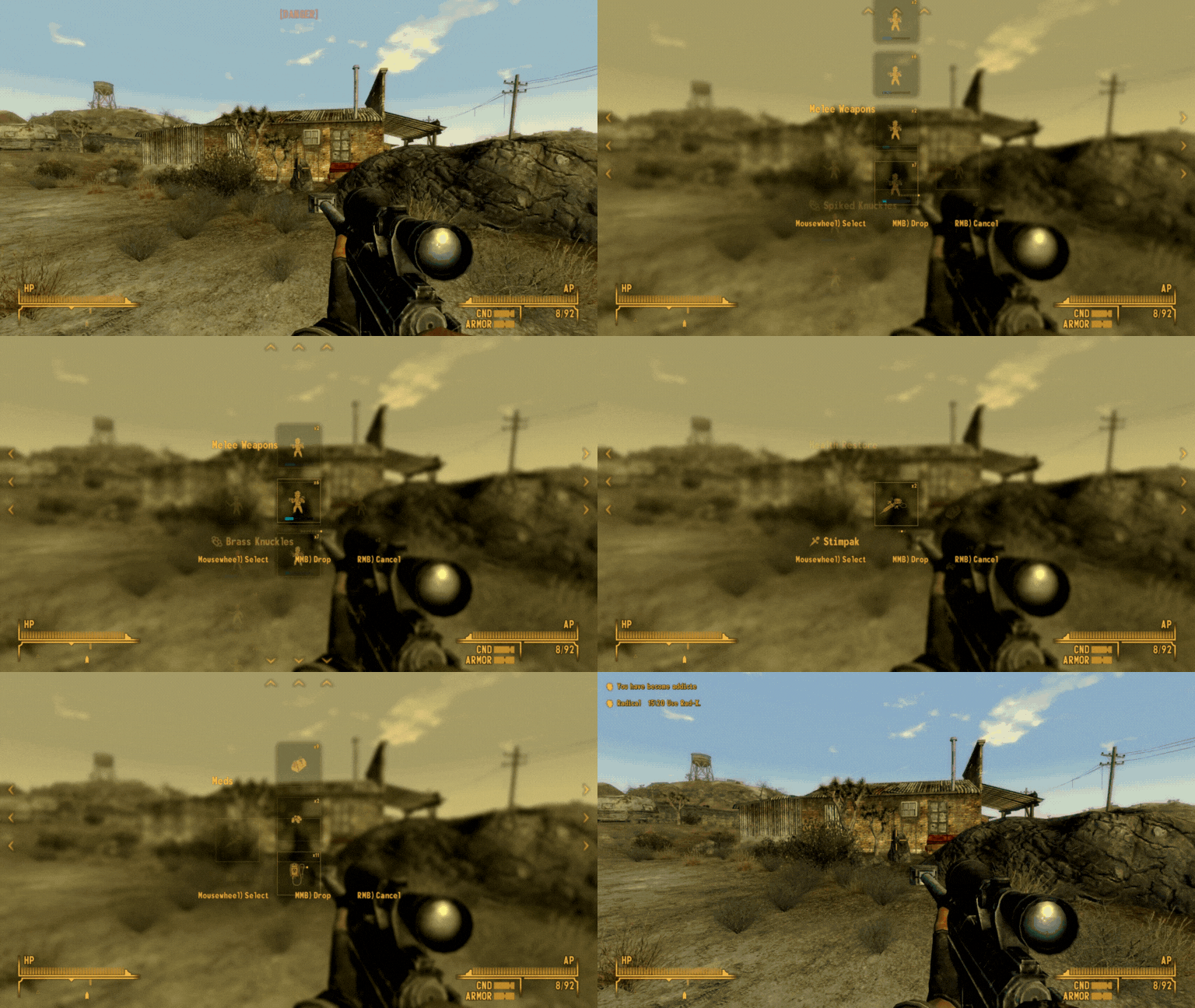
QUIP lets you access your inventory during combat without pausing. Press a hotkey to bring up a menu showing your weapons or consumables, navigate to what you need, and use it. The menu slows down time but doesn't freeze it completely - you're still vulnerable while browsing, creating genuine tension when you're fumbling for a Stimpak mid-firefight.
Hotkey 1 - weapons
Hotkey 3 - consumables
Hotkey 4 - armour
EDIT: Now these are fully reassignable with controller/keyboard which should ensure full compatibility with B42 Holstering
Weapon Menu
Items are organised into categories based on weapon type - melee, guns, energy weapons, explosives, thrown weapons.
Switch between categories horizontally with smooth animated transitions, scroll through items vertically within each category.
The categorisation is entirely automatic, using the game's own weapon type system. This means modded weapons slot into existing categories without any patches or manual configuration.
Each weapon displays its condition as a colour-coded health bar, shows equipped weapon mods, and highlights whether it's currently equipped. The selection pulses gently to show what you're hovering over, of course with configurable animation speed!
Aid Menu
Shows consumable items that are actually consumed when selected. This uses a custom NVSE plugin (UseAidItem.dll) that properly triggers all vanilla consumption behaviour - addiction checks run, item scripts execute, irradiated food applies rads, skill magazines give temporary bonuses, and everything works exactly as if you'd used it from the Pip-Boy. All mod-added consumables work automatically because the plugin hooks into the game's native consumption system rather than reimplementing it.
Optional filters let you hide food, drinks, books, and miscellaneous items so only medicine and chems appear. Particularly useful when you need that emergency Med-X and don't want to scroll past 40 Sunset Sarsaparillas to find it.
Side note: I have grabbed a few opcodes for future mods but will probably expose this function in a future bundled DLL, or add it to showoff/jg if the maintainers accept it. For now I wanted a quick release so it is in here.
Armour Menu
Quick access to all armour and clothing. Shows what's currently equipped with visual indicators. Equip, unequip, or drop items directly from the menu. Handy for switching between faction disguises or swapping armour sets without opening the full inventory.
Since armour doesn't really have categories, this menu is just ALL/Bodywear/Headwear. I could be convinced to do light/med/heavy/PA but for now it works just fine.
Recent Items
You can enable the "Recent" category for any of the big 3 menus. By default, it's only enabled for "Aid" since it's not as useful in the others.
This takes the last 10 items you used (via quip, pip boy or anywhere else) and orders them by date descending.
These latest items are also save baked!
Time Dilation
When QUIP opens, time slows to a configurable multiplier (default 0.1x - effectively 10% speed). You're not frozen, enemies can still shoot you, and projectiles keep moving. The world keeps ticking while you browse, just slowly enough that you can make decisions without getting shredded. When you close the menu, time snaps back to normal speed instantly.
You can adjust the time scale through MCM anywhere from completely paused to real-time if you want the full panic experience.
Note: this also exposes a vanilla bug around SGTM with corpse physics. I'll have a look at this one day when I've got more engine decoded. if it drives you nuts just turn time dilation to 100%
YSI and Filtering
For now, YSI is a hard requirement, because of how filtering works on some parts. However, I do plan to refactor this and simple use a KEYWORDS-based approach in future.
Navigation
Keyboard: WASD to navigate (W/S scroll within category, A/D switch categories), mousewheel to scroll items, middle mouse to drop selected item, right mouse to cancel and close menu. All keys are rebindable through MCM.
Controller: D-pad and triggers for navigation, full button remapping available. So D-PAD opens the menu and either left or right stick scroll through. You can access each menu from within another open menu but this does preclude D-PAD scrolling. I think this is a decent trade-off personally.
The menu supports hold and toggle activation modes. Hold mode keeps the menu open while you hold the hotkey - release to close. Toggle mode opens on first press, stays open until you press again or select something. I hated holding down the hotkey (my inspiration was Zelda Quick Select), so I made toggle mode the default. Six months of work later, here we are.
Visuals
Optional menu blur effect that darkens and blurs the background when QUIP is open, making the menu easier to read during chaotic combat. The blur uses the same effect as the vanilla pause menu.
Smooth animated transitions when switching between weapon categories - the grid slides in from the side rather than instantly appearing. Selection highlights pulse subtly to show what you're hovering over. Animation speeds are adjustable through MCM if you prefer snappier or more relaxed transitions.
The menu preserves your HUD reticle state and restores it properly when closing. Control states are managed carefully to prevent conflicts with other mods.
Customisation
MCM options include:
- Rebind all hotkeys - weapon menu, aid menu, armour menu
- Rebind all navigation controls - scroll, switch category, drop, cancel
- Adjust time scale while menu is open (0.0 to 1.0, default 0.1)
- Toggle between hold and toggle activation modes
- Enable/disable menu blur effect
- Filter weapon types - hide melee, guns, energy weapons, explosives, thrown weapons individually
- Filter aid types - hide food, drinks, books, miscellaneous items
- Animation speed controls - selection pulse speed, category transition speed
- Drop behaviour - close menu on drop, or stay open and continue browsing
- Enable/disable armour hotkey entirely
Technical Features
Scriptrunner of course, you should know that by now.
Includes UseAidItem.dll, a custom NVSE plugin that properly consumes aid items with full vanilla behaviour preservation. The plugin hooks into the game's native consumption system, ensuring perfect compatibility with vanilla items and any mod-added consumables without requiring patches.
The weapon categorisation system uses GetWeaponType, so any weapon added by mods automatically appears in the correct category. No manual configuration required.
If you have ySI - Sorting Icons installed, items are additionally sorted by their ySI tags within each category.
Selection memory - weapon and armour menus open with your currently equipped item already selected. No scrolling to find what you've got on.
Quest items are protected - attempting to drop a quest item shows a warning instead of actually dropping it.
Fires a QUIPItemHover event when selection changes, allowing other mods to hook in and display additional information. This is already hooked into WARPED
Similar Mods
If you're familiar with Zelda Quick Select, this fills a similar niche but with a different approach to categorisation and navigation. That mod was my inspiration and I did speak to the author before this to make sure they were ok with it.
I don't really like weapon hweel as the keybinds were a bit painful, though maybe I was just being stupid. This d-pad + scroll works amazingly well for controllers and that was the whole ethos behind the mod. Hope you enjoy it!
Instructions
Install requirements and use MO2 or place in Data/
Requirements
QUIP - Quick Use Inventory Panel
Main file.


