





FNV CLEAN ANIMATIONS | PART 3
FEATURES
- All weapon iron sights completely aligned out of the box with no user configuration necessary, courtesy of the ISControl Enabler update.
- Fully compatible with B42 Optics out-of-the-box.
- Includes bonus animation set: the K9000 Cyberdog Gun .
- Features 23 total sets.
- Includes all of the features of previously released sets.
- Many weapons have multiple attack, jam, and/or reload variants.
- Covers all animations related to the included sets.
- Supports TTW .
- Gameplay-friendly.
- Compatible with any locomotion mod on Nexus. Please note that "Big Guns" come bundled with locomotion to avoid issues.
- Several improvements made to various weapons.
DESCRIPTION
This mod, as with my previous "Part" mods, collects several weapon animations into one convenient download. Moreover, it includes several fixes and updates to several of the animation sets; this also means that this page will serve as a repository for all future patches to any of these sets, for convenience's sake. There are video showcases of every set in the mod below.
ANIMATION LIST & SHOWCASE
List of weapons that have been reanimated. Click the name of the weapon to view a showcase of it. See the above section for any changes made to weapon animations.
- K9000 Cyberdog Gun (and all variants of such)
- Recharger Pistol
- Recharger Rifle
- Varmint Rifle
- Heavy Incinerator
- .357 Magnum Revolver
- Marksman Carbine
- Silenced .22 Pistol
- Dynamite
- 12.7mm Submachine Gun
- Lever-Action Rifle/Lincoln's Repeater (and all variants of such)
- LaLongue Carbine
- Cryolator
- Throwing Hatchet
- Throwing Proton Axe
- Tomahawk
- Throwing Spear
- Throwing Knife (courtesy of hitman47101 , who can't be thanked enough)
- Grenade APW
- Double-Barrel Shotgun
- Riot Shotgun
- Hunting Shotgun
- Sawed-Off Shotgun
REQUIREMENTS
- xNVSE
- kNVSE
- JIP LN NVSE Plugin
- ISControl Enabler
- lStewieAI's Tweaks
- Set Weapon No Firing Delay to 1.
COMPATIBILITY
- Out-of-the-box compatibility with any mod that does not specifically use kNVSE to edit the same animations.
- Does not overwrite vanilla animations, allowing you to safely switch back.
- Plugins can be easily merged or edited.
FIXING MISALIGNED SIGHTS
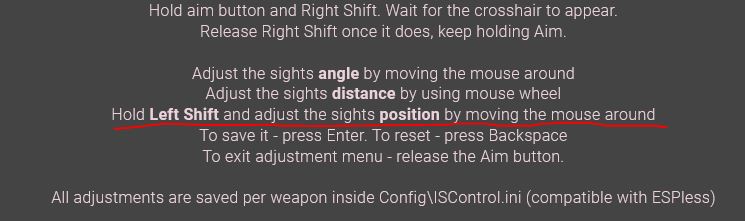
INSTALLATION & CHOOSING WHICH ANIMATIONS ARE INCLUDED
- Download all requirements.
- It is recommended to remove the standalone sets first.
- Download and install this mod, with any addons you desire.
- If you wish to remove any of the included animations for any reason, simply navigate to "data/meshes/AnimGroupOverride," and delete the .json file whose name corresponds to the weapon animations you don't wish to use. All .jsons should be named in a straightforward manner.
- It is not necessary to delete folders, unless you wish to save space.
Instructions
- Download all requirements.
- It is recommended to remove the standalone sets first.
- Download and install this mod, with any addons you desire.
- If you wish to remove any of the included animations for any reason, simply navigate to "data/meshes/AnimGroupOverride," and delete the .json file whose name corresponds to the weapon animations you don't wish to use. All .jsons should be named in a straightforward manner.
- It is not necessary to delete folders, unless you wish to save space.
Requirements
FNV Clean Animations - Part 3
Install all requirements and enable them. Install the mod (mod manager or drag and drop). .esps are required to avoid broken textures on certain weapon meshes. They can be safely merged.


