




New Quickhack shard that unlocks the Charm and the Uncharm Quickhacks. Charming enemies makes them into your followers that will fight with you. Uncharming them removes the effects of the Charm. Comes with customizable Ram cost.
Charm Quickhack
The Charm Quickhack becomes available when you equip the Charm Quickhack shard.
Charming enemies makes them into friendly followers. The effects last until they either die or you uncharm them.

Charmed individuals will fight with you.

They are also capable of entering vehicles and helping with vehicle combat.

You can charm the police, gangers, androids, drones, mechs , maxtac and even bosses.

Uncharm Quickhack
The Uncharm Quickhack becomes available on Cha rmed NPCs. Applying the Uncharm Quickhack returns the NPC to its default state.

Settings
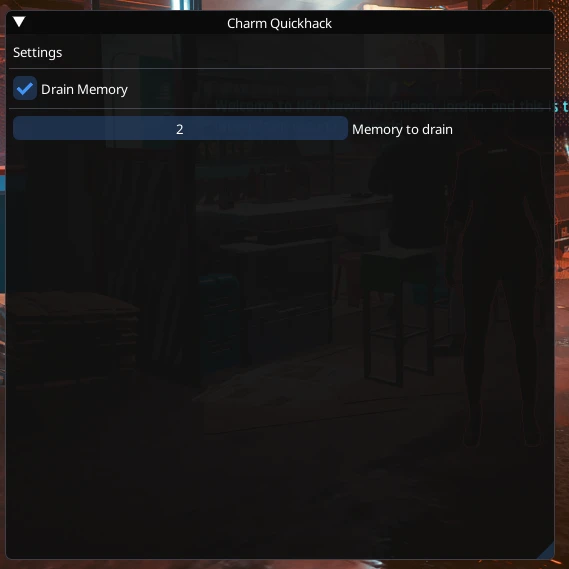
You can customize the Ram cost of the Charm Quickhack in the mods Settings. You can even disable the Ram cost completely by disabling the Drain Memory setting. The settings menu shows up along with the CET menu.
Acquisition
You can get the Charm Quickhack shard from my Atelier shop: YakuzaDeso's Atelier shop
You can also add it in your inventory with this CET command:
Installation
- Download and install Cyber Engine Tweaks.
- Download and install ArchiveXL.
- Download and install TweakXL.
- Download and install redscript.
- Download and install Codeware.
- Download the mod. You should get a zip file.
- Drop the contents of the zip file into your game's root folder.
If you did everything correctly the folder structure for the mods' files should look like this:
- \Cyberpunk 2077\bin\x64\plugins\cyber_engine_tweaks\mods\CharmQuickhack
- \Cyberpunk 2077\r6\scripts\CharmQuickhack
- \Cyberpunk 2077\r6\tweaks\CharmQuickhack
- \Cyberpunk 2077\archive\pc\mod\Charm_Quickhack.archive

Notes
Please do save backups (or not lol, fortunately the game has a somewhat good autosaving feature). I've spent an ungodly amount of time on this mod creating custom logic for a bunch of stuff and fixing issues that appeared along the way (e.g. NPCs not mounting vehicles properly). I'm pretty confident I've finally got everything ironed out but you never know. Fortunately I didn't encounter any game/save breaking bug and there shouldn't be anything that could break things in a serious way.
Known Issues
Charmed police NPCs may sometimes not initiate vehicle combat immediately.
Credits
Credits to Scissors and their mod Drone Companions since their code helped immensely.
Credits to psiberx for their example mods at WolvenKit/cet-examples since their code helped immensely.
Credits to psiberx for the Cron and GameUI modules.
Credits to anygoodname for the SpawnWithCodeware code snippet.
Instructions
Installation
- Download and install Cyber Engine Tweaks.
- Download and install ArchiveXL.
- Download and install TweakXL.
- Download and install redscript.
- Download and install Codeware.
- Download the mod. You should get a zip file.
- Drop the contents of the zip file into your game's root folder.
If you did everything correctly the folder structure for the mods' files should look like this:
- \Cyberpunk 2077\bin\x64\plugins\cyber_engine_tweaks\mods\CharmQuickhack
- \Cyberpunk 2077\r6\scripts\CharmQuickhack
- \Cyberpunk 2077\r6\tweaks\CharmQuickhack
- \Cyberpunk 2077\archive\pc\mod\Charm_Quickhack.archive
Requirements
charm
mod
