

H O R D E
A Follower Management Framework for Skyrim SE/AE
━━━━━━━━━━━━━━━━━━━━━━━━━━━━━━━━━━━━━━━━━━━━━━━━━
Author's Note
I've been working on this off and on since November. It started as a follower system for my custom followers only, but I decided to do something different for them. I realized what I really wanted was a light-weight and slim-featured follower manager. At first it used an MCM and later SKSE Menu Framework. Then I created Tailor and decided to put this into the same UI I made for Tailor (with some improvements). At one point I was doubting if I should even release this because Ivy made such a nice SKSE follower system. That said, I wanted just a little more features so I decided to make it for myself and release it for the rest of you.
Important: If you already use a follower management system it is recommended you uninstall it before using Horde. You may not need to start a new game, but I would recommend running Horde on a new game before trying to run it on a previous save that used a different follower management system (NFF, EFF, AFT).
Overview
Manage up to 20 followers from one sleek in-game panel — no menus, no MCM, no dialogue trees.
Follow, wait, summon, dismiss, sandbox, assign homes, and teleport — all at the press of a button.
Horde replaces the vanilla follower management experience with a modern Prisma UI interface. Open it from a lesser power in your favorites or a configurable hotkey, and every follower is right there — their stats, equipment, perks, and commands on a single screen.
Followers automatically sandbox when you stop moving — they'll sit on furniture, wander, eat, and interact with their surroundings instead of standing behind you like statues. Dismiss a follower to a home and they'll sandbox there too.
Horde works with any follower that uses Skyrim's vanilla follower system (DialogueFollower). Custom-voiced followers with their own frameworks (Inigo, Vilja, Serana, etc.) are detected and left alone to avoid conflicts.
Note: Released as a unified build that works on Skyrim AE/SE. Requires an ESL-flagged plugin (Horde.esp) — does not count toward your plugin limit.
━━━━━━━━━━━━━━━━━━━━━━━━━━━━━━━━━━━━━━━━━━━━━━━━━
Features
Follower Management
- Track Up to 20 Followers — manage your entire party from one panel
- Follow / Wait / Summon / Dismiss — per-follower commands, instant response
- Group Commands — Follow All, Wait All, Summon All — one button or hotkey for the whole party
- Friendly Fire Protection — followers can't damage each other or the player, and won't enter combat with teammates
- Follow Close — optional per-follower leash that teleports them to you when they fall too far behind
- Custom Follower Detection — automatically detects custom-voiced followers (Inigo, Vilja, etc.) and leaves them alone
Sandbox System
- Idle Sandbox — when you stop moving, followers with sandbox enabled will wander, sit, eat, use idle markers, and interact with furniture instead of standing idle
- Wait Sandbox — tell a follower to wait, then enable sandbox — they'll sandbox around their wait position instead of standing like a statue
- Dismissed Home Sandbox — dismiss a follower to their assigned home and they'll sandbox there, living their life
- Per-Follower Toggle — sandbox is a checkbox on each follower's detail card, enable or disable individually
- Automatic Resume — when you start moving again, sandbox followers stop wandering and resume following
Home System
- Assign Homes — set any location as a follower's home with one click
- Home Sandbox — dismissed followers sandbox at their assigned home instead of returning to their default location
- Clear Home — remove a home assignment at any time
- Persistent — home assignments survive save/load
Follower Detail Screen
- Live Stats — health, magicka, stamina with current/max values
- Combat Skills — one-handed, two-handed, archery, block, destruction, restoration, conjuration, heavy/light armor
- Equipment Overview — right hand, left hand, head, body, hands, feet — with damage/armor ratings
- Perk List — all perks the follower has
- Location & Distance — where the follower is and how far away (in meters)
- Race, Level, Armor Rating — at a glance
Controls
- Lesser Powers (Default) — four powers auto-added to your favorites: Horde (open UI), Horde: Follow, Horde: Wait, Horde: Summon
- Keybinds (Optional) — Shift+H to open UI, Alt+F / Alt+W / Alt+S for group commands — all configurable in settings file
- Toggle Between Modes — a button in the UI switches between Lesser Powers and Keybinds mode
- Escape to Close — press Escape to close the Horde UI without opening Skyrim's system menu
- Crosshair Quick-Open — open Horde while looking at a tracked follower to jump directly to their detail card
Technical
- SKSE Cosave Persistence — follower list, settings, and state save with your game automatically
- ESL-Flagged Plugin — Horde.esp doesn't count toward the 255 plugin limit
- Vanilla Dialogue Preserved — Trade and Command dialogue options still work, only Dismiss/Wait/Follow are suppressed (Horde handles those)
- Modern In-Game UI — sleek dark-fantasy interface powered by Prisma UI
- Input Protection — keyboard input is blocked from reaching the game while the Horde UI is open
━━━━━━━━━━━━━━━━━━━━━━━━━━━━━━━━━━━━━━━━━━━━━━━━━
Requirements
- SKSE64
- Address Library for SKSE Plugins
- Prisma UI — provides the in-game HTML interface
- Media Keys Fix SKSE — required by Prisma UI
━━━━━━━━━━━━━━━━━━━━━━━━━━━━━━━━━━━━━━━━━━━━━━━━━
Installation
- Install the four requirements listed above.
- Install Horde using your mod manager (MO2, Vortex, etc.).
- Activate Horde.esp in your load order.
- If you already use a follower system, uninstall it from your mod list.
- Start a new game if you already had a follower system and you uninstalled it - otherwise you can load it mid-save if you never had a follower system in your mod list before.
- Launch the game and have fun!
On your first save load, Horde will add four lesser powers to your favorites menu: Horde, Horde: Follow, Horde: Wait, and Horde: Summon.
━━━━━━━━━━━━━━━━━━━━━━━━━━━━━━━━━━━━━━━━━━━━━━━━━
How to Use
Getting Started
- Recruit followers the normal way — talk to them, hire them, complete their quests.
- Horde automatically detects new followers and adds them to your panel.
- Use the Horde lesser power (or Shift+H if using keybinds mode) to open the management panel.
Horde works with any follower that uses Skyrim's vanilla follower system. Custom-voiced followers with their own frameworks are automatically detected and excluded to prevent conflicts.
Controls — Lesser Powers (Default)
- Horde — open / close the management panel
- Horde: Follow — all followers resume following
- Horde: Wait — all followers wait in place
- Horde: Summon — all followers teleport to your location
These powers are automatically added to your favorites on each save load.
Controls — Keybinds (Optional)
Switch to keybind mode via the button in the upper-right of the main screen.
- Shift + H — open / close the management panel
- Alt + F — follow all
- Alt + W — wait all
- Alt + S — summon all
- Escape — close the panel (works in both modes)
All keybinds can be changed in Data/SKSE/Plugins/Horde/settings.json using DirectX scan codes.
━━━━━━━━━━━━━━━━━━━━━━━━━━━━━━━━━━━━━━━━━━━━━━━━━
The Screens
Main Screen
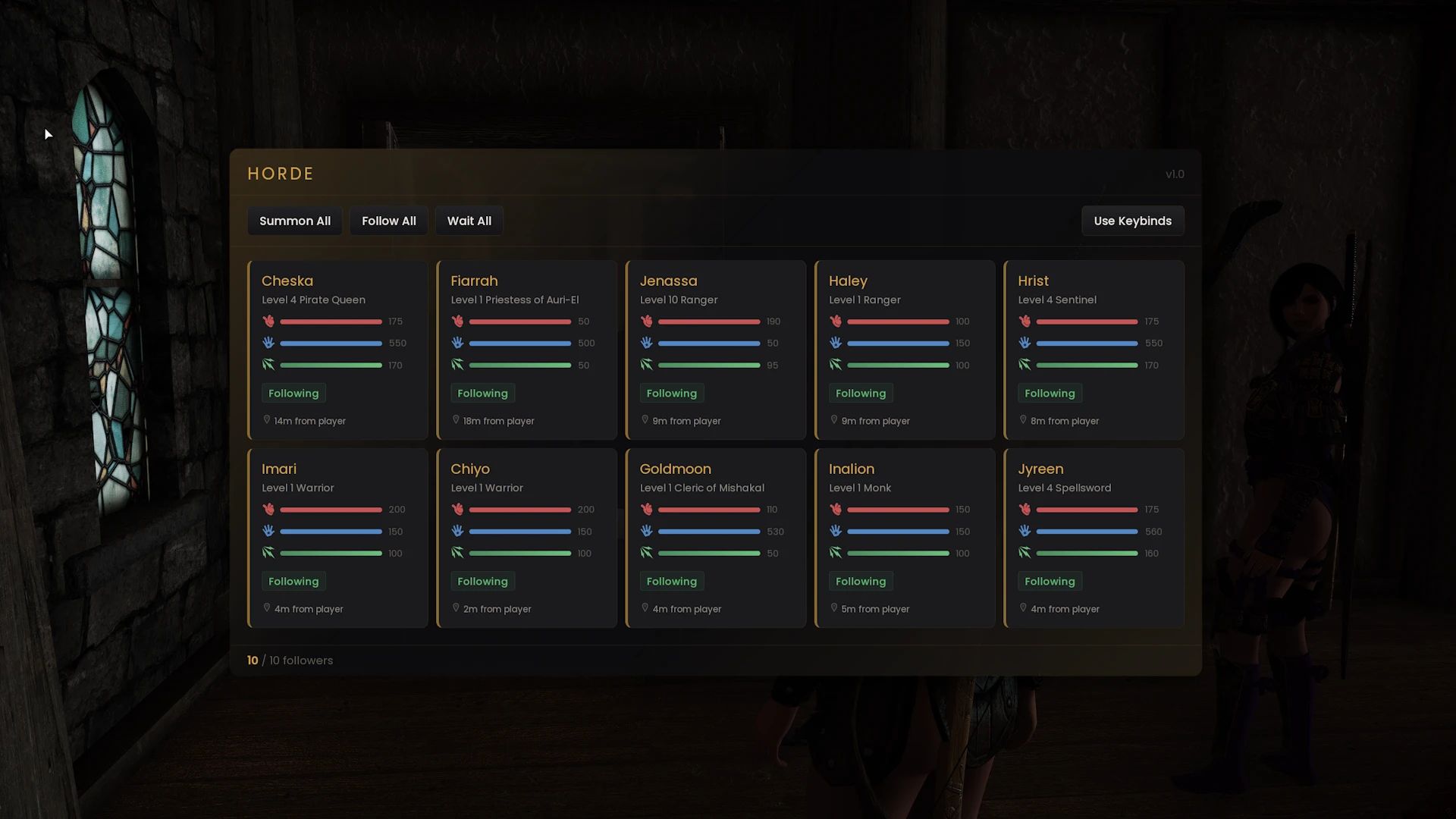
The home screen shows all your active followers as cards in a grid. Each card displays the follower's name, level, class, health/magicka bars, current status (Following, Waiting, Sandboxing), and distance from you.
- Summon All / Follow All / Wait All — group command buttons across the top
- Input Mode Toggle — upper-right button switches between Lesser Powers and Keybinds
- Click any follower card — opens their detail screen
- Empty slots — shown as dashed outlines indicating available capacity
Crosshair Quick-Open: If you're looking at a tracked follower when you open Horde, it jumps directly to their detail card.
━ ━ ━ ━ ━ ━ ━ ━ ━ ━ ━ ━ ━ ━ ━ ━ ━ ━ ━ ━ ━ ━ ━ ━ ━
Detail Screen
Click a follower card to see their full detail view. This screen shows everything about the follower and gives you per-follower controls.
Information:
- Stats — health, magicka, stamina (current / max)
- Combat Skills — nine skills displayed in a compact grid
- Equipment — right hand, left hand, head, body, hands, feet with damage/armor values
- Perks — full perk list
- Location & Distance — current location name and distance in meters
- Race, Level, Armor Rating
Commands:
- Follow / Wait — toggle between following and waiting
- Summon — teleport to your location
- Sandbox — checkbox to enable idle sandboxing
- Follow Close — checkbox to enable leash teleport
- Passive — checkbox to toggle passive mode
- Set Home — assign current location as home / Clear Home
- Dismiss — release the follower from your service
━━━━━━━━━━━━━━━━━━━━━━━━━━━━━━━━━━━━━━━━━━━━━━━━━
The Sandbox System
Sandbox is Horde's signature feature. Instead of followers standing motionless behind you, they live.
Idle Sandbox
When you stop moving for a few seconds, followers with sandbox enabled will start sandboxing near your position — sitting on chairs, using idle markers, wandering, eating, and interacting with the environment. As soon as you start moving again, they snap back to following.
Wait + Sandbox
Tell a follower to wait, then enable sandbox on their detail card. Instead of standing frozen at their wait spot, they'll sandbox around that area. Disable sandbox and they stand still. Both options are available.
Dismissed Home Sandbox
Assign a home to a follower, then dismiss them. They'll travel to their home location and sandbox there — sitting, eating, sleeping, using furniture — like they actually live there.
━━━━━━━━━━━━━━━━━━━━━━━━━━━━━━━━━━━━━━━━━━━━━━━━━
How It Works
Follower Tracking — Horde detects when NPCs join or leave the vanilla follower system (CurrentFollowerFaction) and tracks them automatically. No manual registration needed.
Save Persistence — Your follower list, their individual settings (sandbox, follow close, passive, home assignments), and state (following, waiting) are stored in the SKSE cosave. Everything restores automatically when you load a game.
Package System — Horde manages follower AI through quest alias packages defined in Horde.esp. Follow, wait, and sandbox behaviors are controlled by swapping package configurations at runtime.
Friendly Fire — Damage between Horde followers and the player is instantly healed, and combat between teammates is suppressed before it starts.
Settings — All configuration is stored in Data/SKSE/Plugins/Horde/settings.json. This includes keybinds, max follower count, default sandbox/follow close preferences, and input mode.
━━━━━━━━━━━━━━━━━━━━━━━━━━━━━━━━━━━━━━━━━━━━━━━━━
Settings
All settings are in Data/SKSE/Plugins/Horde/settings.json and can be edited while the game is closed:
- maxFollowers — maximum number of tracked followers (default: 10 - this version isn't designed for more but maybe in the future up to 20 - change this setting at your own risk)
- useKeybinds — false = Lesser Powers mode (default), true = Keybind mode
- defaultSandboxEnabled — whether sandbox is on by default for new followers
- defaultFollowClose — whether follow close is on by default for new followers
- modifierKey — DX scan code for the UI toggle modifier (default: 42 = Left Shift)
- activateKey — DX scan code for the UI toggle key (default: 35 = H)
- groupModifierKey — DX scan code for the group command modifier (default: 56 = Left Alt)
- followAllKey — DX scan code for Follow All (default: 33 = F)
- waitAllKey — DX scan code for Wait All (default: 17 = W)
- summonAllKey — DX scan code for Summon All (default: 31 = S)
━━━━━━━━━━━━━━━━━━━━━━━━━━━━━━━━━━━━━━━━━━━━━━━━━
Compatibility
Compatible:
- Any follower that uses the vanilla DialogueFollower system (most hireable NPCs)
Not Compatible (by design):
- Other Frameworks that manage followers (NFF, EFF, AFT)
- Custom-voiced followers with their own frameworks — Inigo, Vilja, Lucien, Kaidan, etc.
- Serana (uses DLC1 quest system)
- Custom framework followers are automatically detected and excluded — they continue to work normally with their own systems
Note on Other Follower Frameworks:
Horde is designed to be a standalone follower manager. Using it alongside other multi-follower frameworks (NFF, AFT, etc.) is not recommended and may cause conflicts with package management.
━━━━━━━━━━━━━━━━━━━━━━━━━━━━━━━━━━━━━━━━━━━━━━━━━
Troubleshooting
UI doesn't appear
Make sure SKSE, Address Library, Prisma UI, and Media Keys Fix are all installed correctly. Verify that Horde.esp is activated in your load order. Check SKSE/Horde.log for errors.
Lesser powers don't appear
Powers are granted on save load. If you just installed Horde, load a save (not "new game") and check your Powers list. If using keybind mode, switch to favorites mode via the UI button first.
Follower not tracked
Horde only tracks followers that use the vanilla DialogueFollower system. Custom-voiced followers with their own quest frameworks are intentionally excluded. Check SKSE/Horde.log — it logs which followers are rejected and why.
Follower doesn't sandbox
Make sure the sandbox checkbox is enabled on their detail card. Idle sandbox only activates when you stop moving for a few seconds. If the follower is waiting, enable sandbox after setting them to wait. If the follower doesn't sandbox in 5 seconds, try disabling and enabling the sandbox again. This should clear the packages.
Follower stands still when sandbox is enabled
Some locations have limited navmesh or furniture. The follower will do what they can with what's available in the area. If you are sure there is furniture in the area, try disabling and enabling the sandbox again. This should clear the packages.
Hotkey conflicts with another mod
Edit Data/SKSE/Plugins/Horde/settings.json to change keybinds, or switch to Lesser Powers mode.
Escape opens Skyrim's menu instead of closing Horde
This shouldn't happen — Horde intercepts Escape when the panel is open. If it does, check for conflicting input mods.
Too many followers causing lag
Reduce maxFollowers in settings.json. Even on high-end hardware, large follower counts can impact performance depending on the area and NPC complexity.
━━━━━━━━━━━━━━━━━━━━━━━━━━━━━━━━━━━━━━━━━━━━━━━━━
Typical Workflows
Build your party:
- Recruit followers normally through dialogue
- Horde detects them automatically
- Use the Horde power to check your roster
Manage followers in combat:
- Use Horde: Wait to hold everyone in position before a fight
- Use Horde: Follow to regroup after
- Use Horde: Summon if anyone gets lost
Set up a follower's home:
- Travel to the location you want as their home
- Open Horde > click the follower > Set Home
- Dismiss the follower — they'll sandbox at that location
- Recruit them again anytime — their home is remembered
Enable sandbox for natural behavior:
- Open Horde > click a follower > check Sandbox
- When you stand still, they'll wander, sit, and interact
- When you move, they follow again
Wait with sandbox:
- Open Horde > click a follower > click Wait
- Check the Sandbox box on the same screen
- The follower sandboxes around their wait position instead of standing still
━━━━━━━━━━━━━━━━━━━━━━━━━━━━━━━━━━━━━━━━━━━━━━━━━
Created by ColdSun
Built with CommonLibSSE-NG | Prisma UI | C++23
Comments (16)
Log in to post a comment.
A great follower framework. Has just enough for me and what little extra I needed can be supplemented. Like a mod to teach followers spells from books works fine along side this. Adding Tailor to this gives me everything I need to handle my followers.
💖💖💖💖💖💖💖💖💖💖💖💖💖💖💖💖💖💖💖💖💖💖💖💖💖💖💖💖💖💖💖
Hey ColdSun! I love this mod - been using it since you first made it. I was thinking about something today - one more button/command that would tell the follower to go to bed, or find a place to sleep. I know there are sleep for me now and auto sleep for me now mods, but sometimes they work and sometimes they don't, then you have to get back out of bed and find the follower to tell them to go to bed - if it was an option in the interface, then a simple button press would make them do this. Just a thought I wanted to ask about.
One thing, the description mentions a perk list but I can't seem to find it anywhere. Is there a special button or panel I have to click to get it to show? I'm probably just being blind.
Hi, thank you for making such an amazing mod! I have a small request: could you keep the original vanilla dialogue for dismissing followers? It would make the game feel much more immersive. Thank you so much for your hard work!
I had some problems having both. I might need to disable the feature in Horde itself. I'll think about it in the next update. Thanks for your kind words!
Friendly fire still occasionally happens, but only when magic is involved, the strangest part is that it results in a ctd that doesn't generate a crash log (don't know yet if the ctd is a problem with horde or some other mod)
The only reason I can think of, is that the follower that causes the friendly fire is not using the hand variation version of the spells.
There are situations that Horde can't stop when it comes to friendly fire, although that is also true with other follower management systems, even NFF which is really the most robust of them all. That said, I'm sure Horde isn't causing your crash in this case.
There is no settings.json file in the archive. How it must be structured?
It creates the settings.json on first run.
Bugs:
Followers went back to their original places after they were assigned new home.
I went to an Inn, for example Whiterun Drunken Huntsman, recruited a bunch of custom followers, then went to a new custom home, used "Set Home" to assign followers to the new home, then dismissed them.
After quitting the game and restart, all followers went back to the Inn. At the Inn, if I recruited them again, and show each follower's details in Horde list, their Home was correctly listed as the custom home's name.
You have something else interfering with their AI packages. Do you have another follower manager installed?
In DA02 Boethiah's Calling, you cannot sacrifice followers.
Removing this mod allowed me to sacrifice them.
You didn't have to remove the mod. Just uncheck the essential box in the follower's detail screen.
I had the same issue; unchecking the essential didn't work. Had to disable this mod to complete the quest.
Thanks, I'll look into it.
How do you re-assign keys without using modifiers (Shift/Alt)?
In the settings.json file, I deleted this line
"modifierKey": 42,
and remap the activation key to "\"
"activateKey": 43,
restart the game, but it still require SHIFT+\ to activate.
Tailor and Horde are amazing apps!!!
Please add simple Home management to Horde. Then there's no need for any other mod to manage followers.
When assigning a follower to a home, add the home to list of homes if not already there. Allows users to rename the home.
On Home Management page, shows list of available homes, with tenants count for each home. "Remove Home" button, only if there's no tenants.
Clicking on a home will show list of all tenants in the home, with buttons for Evict, Move (to another home) for each tenant.
In the Horde list of followers, add "Assign Home" button for each follower, which will allow user to select which home to assign to without having to physically travel/move to that home first. When a follower is dismissed, he/she moves back to the assigned home or default location.
Being able to assign followers to any 'Home' location in Skyrim, even in open space, forest, mountains, caves, etc., not just inside a building.
Be able to teleport to any home, or any tenant in a home.or bring any tenant to player's current position
Again, thanks so much for all the works you provided to the community.
Hey. A quick tech question.
I am using Gate to Sovngarde collection and the keymap of "Shift + H" is used by the collection to call your horse. Since Horde uses the same keymap, is there a way to re-assign the Horde keymap in the JSON file?
Sorry, I do not have access to your discord page (Discord is not my friend).
- Thanks
Ok. I found a solution to my own issue.
In the MCM, I had to map the Call Horse option to a different key and then in the Horde JSON, needed to set "useKeybindings" property to true.
It now works great and I am excited to use it.
thank you for your hard work.
My pleasure.
Hello Coldsun / Heath
I like to make a request relating to the wishes of a follower. Please add the option that the follower doesn't want to get married, because procreation is not part of TESV. Marriage to me only makes sense for raising and educating children. In other words, marriage only makes sense with a procreation infrastructure (i.e. educational facilities, nurseries... etc).
Some people might think that marriage provides an abo for sexual intercourse, but for for that it's not necessary to get married. I always feel anoid if a follower comes up with family issues. Even in case of not beeing a Thane or better, it should be natural for any follower to serve with love and understanding, not to be confused with a
patriachic mindset.
So I've been running both Tailor and Horde on this playthrough. Having used other follower management mods before (as did all of us) there is one thing that is part of NFF that was useful that would be fantastic as part of Horde: the ability to send your follower to sell extra gear to the store. I am no coder, so I have no idea just how complex such a function would be, but it'd be neat, although not a high priority.
Hello dear Coldsun,I found you here from Nexus. I’m sorry to see you’ve left, but I understand.
I’m commenting to ask again if you could add a Tab key to go back to the previous menu. Right now the system only lets you exit with Esc, with no way to go back a page, and it’s really uncomfortable to use.
Also, could you add buttons for one-click dismiss all followers and one-click remove invincibility? I’m sure many people would want those.
Another thing I mentioned before: followers that are already set as essential (most custom followers are made this way) still stay essential even if you toggle it off via your button. They only go down to bleedout. I was wondering if you could make a standalone framework just to fix this properly?
Thank you so much for all your hard work. I’ve already shared your mods with many people, and I hope more and more will support you.
Thank, I will look into those things and consider. Have a great day!
ColdSun Maybe you can refer this:Follower Death and Injury Chance - Followers Can Die at Skyrim Special Edition Nexus - Mods and Community
Quick question regarding followers: are the 20 followers active ones only, or does that include dismissed ones too? I'm asking because I tend to hoard them...
It tracks the dismissed followers but they dont count against the current follower limit of 20.