

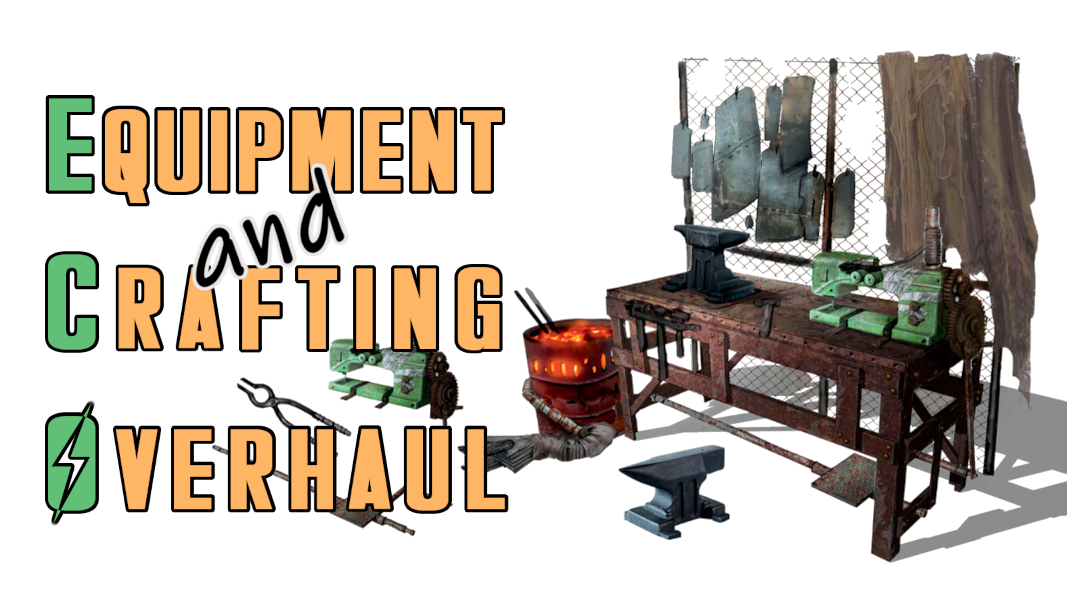
Extensive, lightweight and highly compatible expansion of the equipment and crafting system. This mod was designed to be a framework and easily expandable. Includes optional DLC support/expansions. Everything included is fully modular and customizable to your own needs. Every feature can be configured in the blink of an eye via holotape or optional MCM.
New Workbenches (optional, configurable via holotape/MCM)
- Universal Workbench: This new bench is multi-functional, you can craft and modify everything with it. There's both a mobile and a stationary/workshop variant available.
- Power Armor Station: ECO also comes with a new more compact PA workbench alternative you can use instead of the vanilla ones. It comes both in mobile and stationary variants as well.
- Mobile versions of the Universal Workbench and PA Station can be transported in your inventory and deployed anytime. Once you're done pack them up and continue your adventure.
- Multiple new recipes for ammo, armour, junk, weapons and all sorts of other items distributed across the multiple modes of ECO's workbench.
- The new workbenches can be used during combat but it's risky.
Universal Equipment Enhancements - General (optional, configurable via holotape/MCM)
- Doesn't require separate implementation for other mods. Works right out of the box and can be applied to any item in multiple ways. More on that in the "In Detail" section.
- Change, balance and enhance mechanics of your equipment, including armour/clothing, power armour and weapons, basically anything you can modify on a workbench. More on that below.
- Apply a legendary attachment point to any equipment that has it missing, directly from within the game. This can be useful for those of you who are using a legendary crafting mod.
Universal Equipment Enhancements - Armour and Clothing (optional, configurable via holotape/MCM)
- Apply new unique effects to your armour, like a functional jetpack (no model), set jump height and more.
- Add a customizable and modular Targeting HUD to your (power) armour with corpse, friend and/or foe highlighting.
- If a piece of armour or clothing has the vanilla ballistic weave slot missing, you can apply it from within the game. There's also an assortment of new weave types implemented in a balanced way. You still need to complete the Railroad quest to enable that option (or use the cheat option in ECO's holotape/MCM).
- Make any armour or clothing piece invisible or have the visual armour size (light, medium, heavy) on base game armour pieces (Leather, Metal, Combat, etc.) changed. At the Armor Workbench, you'll get an additional menu called "AA: Armor Appearance" that holds these options.
- If you want to change the size including the armour's stats you can do so now, from the armour's unlocked vanilla "Size" slot. This one doesn't require ECO's entry point and is available by default.
- Modify and balance your armour and clothing stats via multiple modifiers.
- Second material and misc effect for your Power Armour and modify it the same way as your armour.
- All available slots are listed below, under the "In Detail" section.
Universal Equipment Enhancements - Weapons (optional, configurable via holotape/MCM)
- You can alter almost every stat of a weapon, in theory even those of grenades, mines and such.
- There are many modifiers available that can transform your weapons to work fundamentally different.
- Add conversions to make your guns fire ammo they usually can't, directly from within the game, without the need for patches. Or add just a projectile override the same way. That way you can retain the ammo used while still making the gun fire another projectile (e.g. Mini-Nukes).
- Change firing modes. Make a semi-auto gun, that is only available in that variant by default, fully automatic regardless of its original state.
- Alter damage, recoil, rate of fire, sight/scope variables etc. There are almost no limits.
- All available slots are listed below, under the "In Detail" section.
Quick Modification (optional, configurable via holotape/MCM)
- A new menu that can be accessed via item or hotkey (if MCM is available).
- Switch between various ammo types, firing modes, sight zoom and ADS speed options on the fly.
- This works with any kind of weapon whether it's a vanilla one or one added by another mod.
- Switch between attachments (scopes, muzzle devices, magazines, etc.) for your guns and melee weapons. Vanilla weapons and attachments are already part of this system. Mod-added weapons and attachments require individual implementation, as can be seen here. Check the Requirements menu and its "Mods requiring this file" section above to find more mods that extend this system / add support for additional weapons.
- There's also an attack/firing mode quick switch available that allows for cycling through or toggling between attack modes. E.g. automatic, semi-automatic, and burst fire (when the burst extension is installed).
- You can make those modifications in any situation, therefore it's especially useful in combat.
- Optional F4SE (Script Extender) support. If you have F4SE installed Quick Mod automatically switches to an improved mod swapping function that simulates the process as if you were using a workbench. This feature can be toggled via holotape/MCM as usual.
- Do you want to create your own Quick Mod menus for weapons and such? A tool for that purpose can be found in the download section under Optional Files.
Attachment Point Framework (optional)
- This is mostly for mod developers and my own expansions. As a mod user, if you don't use any mod that does make use of this, it won't have any impact - neither positive nor negative - on your game.
- All of ECO's and the entire range of vanilla slots are properly sorted in workbenches.
- The included keywords should cover the most common attachment points (AP) any weapon mod might want to make use of. That makes it easy and efficient to set up new attachments and have them properly sorted.
- The available keywords for guns are ranging from separate ammo/calibre slots, over bayonet, bipod, fire selector, handguard, laser sight, rail, to multiple receiver and sight slots so that those can be broken down in individually modifiable parts, and more...
- Attach points for melee weapons are covered as well, but they are the minority here because there's not a whole lot of mechanics a melee weapon could be assembled of.
- There are also a couple of general weapon APs, like for toggleable animations, decals, paints, etc.
Ammo Conversion Framework (optional)
- This is mostly for mod developers and my own expansions. As a mod user, if you don't use any mod that does make use of this, it won't have any impact - neither positive nor negative - on your game. It'll lie dormant and is inaccessible until another mod makes use and enables certain parts of it.
- Contains premade conversion forms for many real-world and lore-friendly ammo/calibre types. You just have to fill in the actual ammo and leveled item form for a given ammo type you want to add, and set its associated global variable (GLOB) accordingly, and voila, it'll appear in the Ammo Conversion slot (part of Universal Equipment Enhancements) and Quick Modification menu.
- ECO's optional extended INNR has rules implemented for those ammo conversions as well, so items will reflect applied conversions in their item names.
- The optional extensions contain examples of this framework made use of with Armament and Munitions .
New Instance Naming Rules (INNR) (optional)
- This option can be selected/enabled from the installer package.
- Custom and extended INNR included for armour, clothes, guns, melee weapons and power armour.
- These INNR add multiple new vanilla naming schemes and custom ones based on ECO's item modifications (legendaries, ammo conversion, etc.).
- They pair well with the FallUI suite and an item sorter like Simple Sorter or Complex Sorter, but work just fine on their own.
ECO Patcher for Complex Sorter (optional)
- Compatible with FO4Edit 4.1.5f or older. Doesn't support FO4Edit 4.1.5g or more recent. Use Collective Modding Toolkit to upgrade the plugin.
- This is a plugin/module for Complex Item Sorter. It'll automatically apply once you install and run Complex Sorter.
- The patcher plugin can be configured from Complex Sorter's main/plugin menu. You can choose which features you want to make use of and which plugins in your load order you want to be affected by it.
- One of the options is to allow the patcher to scan your installed mods for crafting recipes unrelated to chems and therefore the Chem Station and move them to ECO's multi-functional Universal Workbench. You'll no longer have a cluttered Chemistry Station with lots of different armour, weapon, ammo or other random recipes that don't belong there.
- Another option is the ability to add ECO's entry point attachment point (that holds the Universal Equipment Enhancements) to all items, so you don't have to do that manually/individually in game.
- And/or you could make it apply Instance Naming Rules to items that have them missing.
- ECO also includes some optional item sorting rules for Complex Sorter in case you want to use its item sorting features.
RobCo Patcher Support (optional)
- Does not work with the alpha version of RobCo Patcher for Next Gen. That version of RobCo is highly unstable and may lead to crashes and other instabilities.
- This option can be chosen/toggled from the installer package.
- It is a preconfigured file for users that have RobCo Patcher installed. If you don't use RobCo Patcher that file won't do anything and lie dormant until you install RobCo Patcher.
- The patcher file will make sure that ECO's entry point used for its Universal Equipment Enhancement feature is automatically applied to all armour/clothing and weapons in your load order upon starting the game. More on that below in the "In Detail" section and "Universal Equipment Enhancement" sub-section.
Miscellaneous (optional)
- Canary Save File Monitor Support: This is optional, you don't have to use Canary but if you do you'll benefit from ECO supporting it. You'll get notified when you load a save file that suffers from data loss that would affect ECO's functionality. There's no downside in running it, just upsides. More on the mod's function can be found on its mod page: Canary Save File Monitor
Packaged Extensions (optional)
- Universal Workbench Modes: The installer includes plugins that make other mods' functionality available on the Universal Workbench. Currently there are plugins available for Auto OMOD Stripper, Immersive Hunting Overhaul and Universal Disassembler.
- Crafting and Quick Mod: Additional functionality made available for Burst-Fire Framework (BFF), Real Time Cover Penetration Framework, Tactical Reload, Uneducated Reload, West-Tek Optics Pack.
- Ammo Framework Extensions: Full integration into ECO's frameworks for Armament (retired) and Munitions (now hosted on a new mod page).
- Misc. Extensions: Gunsmith Overhaul and Standalone Workbenches
- Details on all the individual extensions can be found in the Articles section and directly within the installer package, as descriptions when hovering over an option.

Comments (0)
Log in to post a comment.
This thread is open for discussion.
Be the first to leave a community review!